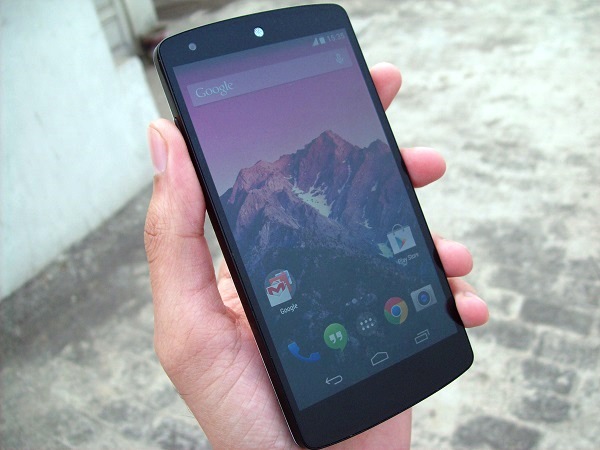
LG’s newest offering adds punch to a device that improves on its predecessors, if you can ignore a few niggles.
by Manik Kakra
The Nexus series has only gained popularity ever since it was rolled out by Google. With the Nexus One and even the Nexus S, the series of phones was only aimed at developers and modders who are interested in their phone’s internal – be it software or hardware. With the Galaxy Nexus, we saw quite a few users starting to take an interest in the phone (big thanks to its pentaband capability).
Then came the Nexus 4, and Google along with LG, decided they would also play with the price factor. The device was shiny, made out of glass, almost latest hardware, and latest software. And now the Nexus 5 – latest hardware, software, simple design, and again a price that won’t make your wallet cry as most of the other flagships today may.
What’s really up with the Nexus 5?
Hardware: LG’s Nexus 5 (D821) is more or less, at least internally, based upon the LG G2. Powered by the Snapdragon 800 SoC (2.2 GHz Krait 400 quad-core, Adreno 330 GPU) and 2 GB of RAM. It comes in 16 GB and 32 GB storage options, and packs 2,300 mAh battery. Running on the latest Android 4.4.2 OS, the phone has, of course, stock Android.
Sporting a 4.95-inch full HD LCD touchscreen, the phone is slightly smaller than the G2, but larger than the Nexus 4. On the back, there is an 8 MP (AF) camera, along with an LED flash; while the front has got a 1.3 MP camera.
Design: The phone has a very simple design. You won’t be left breathless with its looks, but it is not boring at all. With rounded edges and a curved back, the phone fits nicely into your hand. The plastic used (white model in my case) on the back is not very glossy or slippery. Similarly, the front is also not completely coated in glass like the Nexus 4.
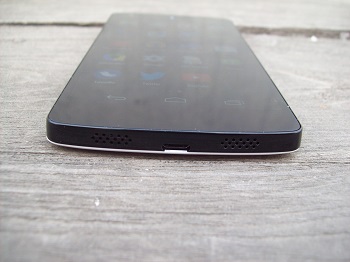
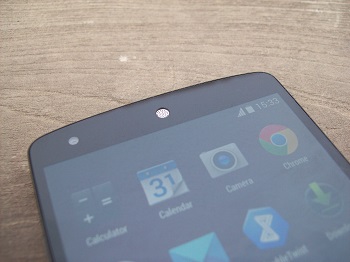 On the front, above the screen, there is a distinct white speakergrill, and below the screen. Two grilled speakers at the bottom (only one is a loudspeaker, while the other one is a mic), with the microUSB port placed between them, sort of reminds me of the iPhone 5. On the back, the Nexus logo, which is reflective on the white model, looks nice and certainly adds to the phone’s overall looks.
The camera protrudes a bit at the back. On a side note, pressing the back of the phone with your thumb or finger, especially on the logo, causes the back panel to get pressed, and that might bother those who care a lot about their phone’s body. That pretty much tell you this isn’t your HTC One or iPhone 5 when it comes to build quality. On the left side panel, you only have the volume rockers, and on the right side panel are the micro SIM slot and Power/ Lock button placed right next to it. These buttons are made out of ceramic and are quite sharp than your usual physical buttons, which could be a bit uncomfortable for some, it was just fine with me. Thanks to these buttons construction, you get a nice feedback on pressing them pretty much every single time.
Having said that, if you try shaking them left and right (rather, rattling them), you’ll see they aren’t very well put together in the whole body – this definitely bothered a little. The top has the 3.5 mm headset jack, secondary mic, and there is an LED light right under the screen, where you would normally have physical buttons.
Screen: The phone has a 4.95-inch 1080p LCD. LG hasn’t really disappointed us before when it comes to screens, and it isn’t very different here. The screen is quite bright, colour-rich, and has got decent viewing angles. My review unit had a light leaking issue (right next to the volume buttons and front-facing camera, probably just a one-off case), but it isn’t really an issue in any other units I’ve seen. While the screen isn’t as nice as the G2 or Note 3, it is pretty good and holds quite well against today’s flagship phones’ screens. And yes, it is very well calibrated.
Camera: The phone boasts an 8 MP camera that also has OIS and can shoot 1080p videos. You can check a few sample images here.
The camera is not bad. The 4.4.1 (presently on 4.4.2) update made the stock camera app faster, images sharper, but you may feel you’re still missing out against the likes of the iPhone 5s, LG’s own G2, S4 or even a year-old iPhone 5. Google has also introduced HDR+, which isn’t exactly your traditional HDR mode. HDR+ seems to give different result than what you would expect from HDR, but the mode definitely helps in taking good shots with the Nexus 5’s camera.
You can change the default camera app, but it may not enjoy access to core level as the bundled app does, which means less options and power available to you while taking shots. So,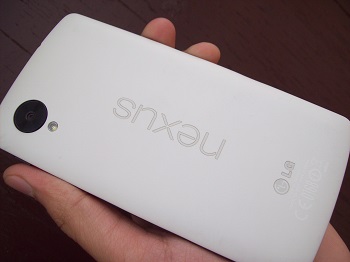 the camera quality is pretty good in daylight, but is just average when the conditions aren’t favourable. To sum the phone’s camera quality, it is noticeably better than the Nexus 4, but well short of the G2.
Audio: The phone’s in-ear audio quality is clear and quite loud (using the bundled headsets). But the loudspeaker’s output is disappointing. It is tiny and distorts at the two highest volume levels. It is way below the G2‘s quality.
The call quality is fine, though I have used phones with louder in-ear sound, I didn’t have any problem with what the Nexus 5 does. WiFi reception holds just as well, and network reception is just as good as you would expect from a flagship smartphone today.
Software and performance: Android 4.4 marks the platform’s move from Dalvik cache to ART (Android RunTime), apart from visual tweaks, new APIs and features. While it is still in the testing stage, you can enable it from Settings in order to give this new runtime a shot, and it’s clear that Google probably wants an alternative to the long-running Dalvik, but whether this is to support mid-range Android devices or just to give an overall performance boost, is yet to be seen.
Android 4.4 KitKat has, other than anything else, given the OS a visual change. There are quite a few changes you’ll see as soon as you start using the device. The icons are now slightly larger than before and that’s definitely a good move by Google. Simply making them larger has given the stock launcher a facelift and also icons in the dock much nicer. I wish fonts used would have also been something different, but that may be just me. It has three Home screens by default, plus, Google Now on the leftmost (swiping left to right) and uses “OK Google” to start the voice assistant.
You still have the Google search bar put on Home screens, same folder and icon arrangement – no changes there. Pull down notification bar is also a bit changed. Settings has now been given a place in the bar and its icon has changed to a cog. The more you use the OS, you will see Holo design has been, umm, whitened. It has been made a few shades lighter, and I am not complaining.
Another addition to the OS is better native emoji support. This means there are no more blank boxes or half missing emojis in any app. The stock google keyboard gives you emojis on long-pressing the Enter key.
Oh, and Google has replaced the default SMS app to Hangouts. So, your video calls, GTalk and phone messaging are all under Hangouts. Is it done neatly? No. This was probably the only half-baked part of the OS. If you’re a heavy SMS user, installing a dedicated SMS app and making it the default is suggested, especially since the Hangouts app doesn’t do good job at separating messages, GTalk IMs and video calls from one contact from your Contacts list.
 Using TrueCaller? Well, Google has sort of come with its own way to give users identification to numbers in their call list. If the number is listed in Google’s Business data, you can search the number in Dialer to see the contact details. Handy.
As far as the phone’s performance is concerned, Google has already released two minor updates since the phone got out, and Nexus 5 surely utilises its software and hardware combination in a great way. The OS runs very smoothly – I had no app hiccups (ART may not be your best option here), and I didn’t notice any performance issues throughout my usage. The Nexus 5 is, without a surprise, one of the smoothest smartphones out there.
I think LG’s Nexus 5 is probably the best smartphone you could by in Rs 30,000 today. If you are okay with its camera’s performance, and those little hardware niggles (buttons and back) aren’t going to worry you, this is a great phone for you that guarantees prompt OS updates and gives good hardware inside to power all of it.


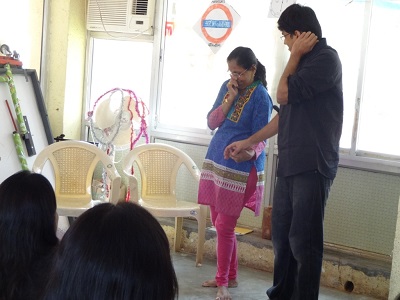 What was the need for this? Says Sailesh Mishra of Silver Innings, who we teamed with for ‘Koffee With Kahani’, a storytelling session over snacks and coffee, “When we were young, our grandparents told us stories to amuse and educate us. Sometimes, they made up stories on the spot. This activity helped generations bond with each other. These days, though, with families going nuclear and even with grandparents and youngsters glued to TV sets, the art of storytelling is lost. There is hardly any conversation between our elders and us. So this activity will, we hope, bring back our storytelling tradition in a fun way.”
 Bengali provided background vocals to set the stories to music – in Navanita’s story, the gifted singer even provided siren sounds!